
Time tied to work
Connect every tracked hour to the project, task, and note that explains it.
AI-powered workforce clarity for distributed teams
ClareSight connects time, activity, screenshots, projects, and approvals, and an AI that reads each day for you, so teams can work with clear, verifiable accountability.
Role-based visibility. Policy-defined tracking.
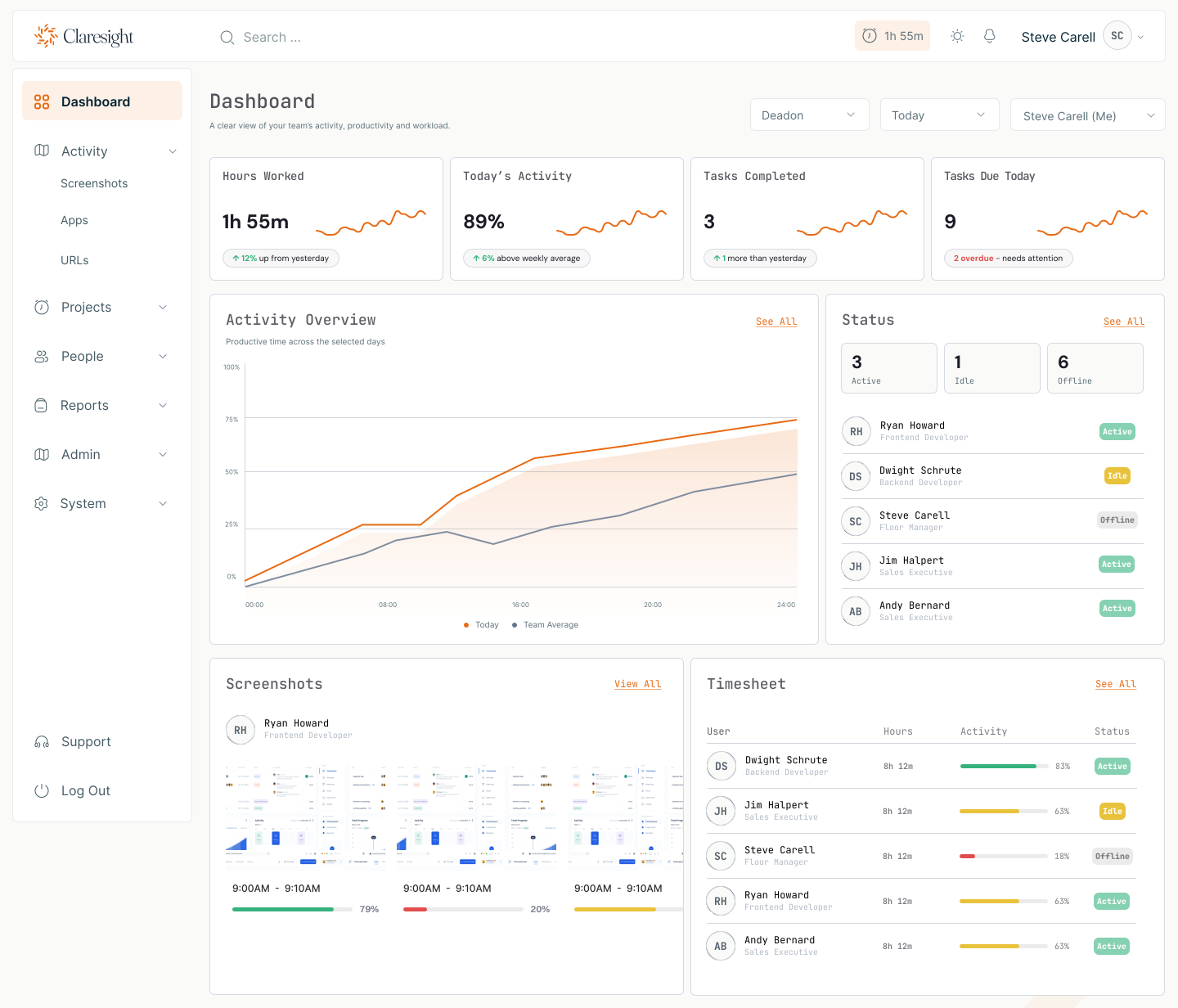
What ClareSight connects
Why ClareSight
ClareSight brings the evidence behind time, delivery, and approvals into a single view. Managers spend less time chasing updates. Teams get clearer expectations. Owners see where attention is needed.
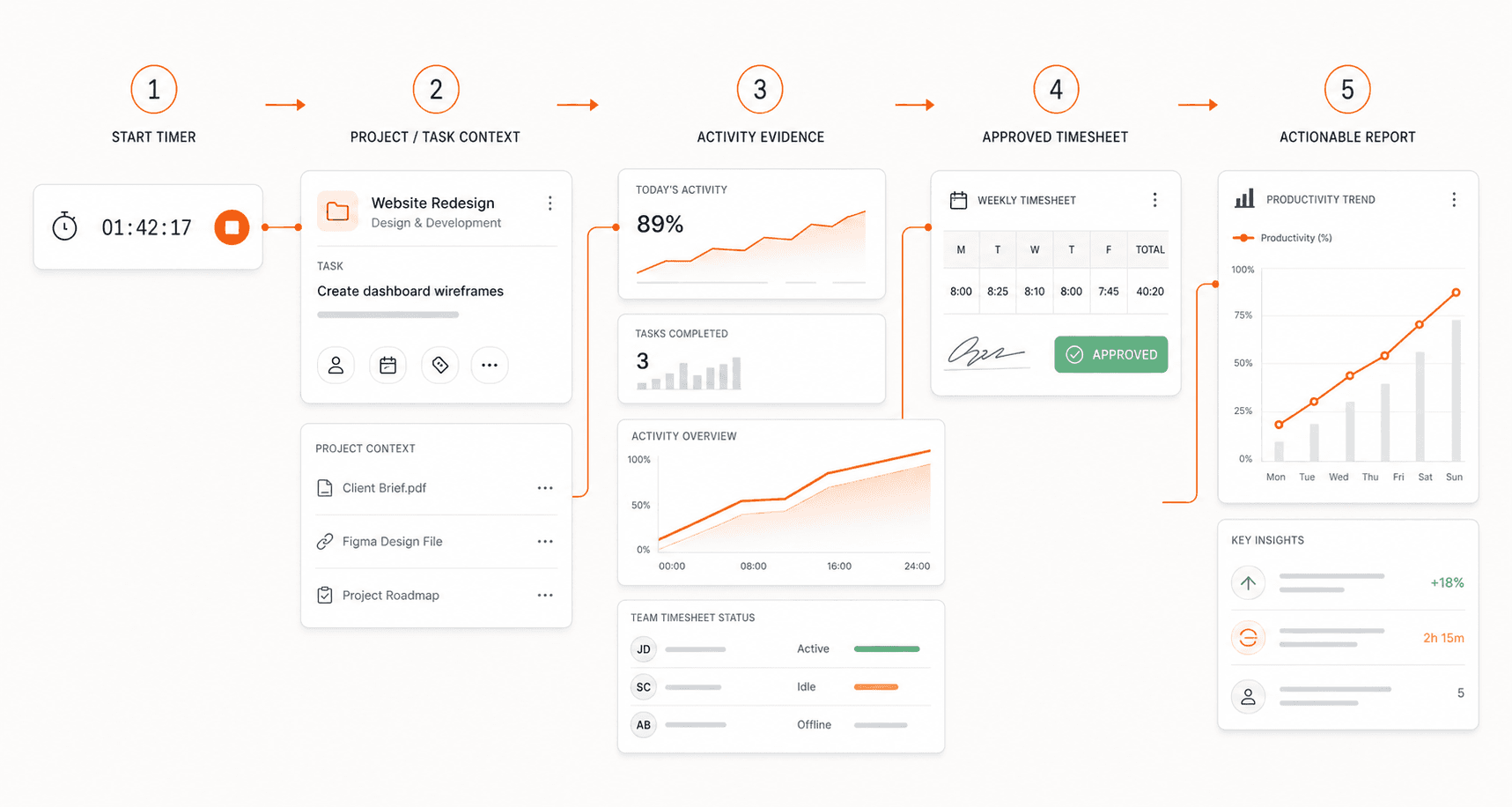
Connect every tracked hour to the project, task, and note that explains it.
Review configured screenshots, apps, URLs, and activity alongside assigned work.
Give managers the context to review timesheets, attendance, leave, and manual time.
Find delivery, attendance, and activity patterns while there is still time to respond.
AI, built in
Every morning ClareSight writes up each person's day and each team's day from the time, apps, and activity behind it. In between, ask Clare anything about your own data. AI is included on every paid plan, with a monthly usage limit.
Maya spent the day on the Brand Refresh project, mostly in After Effects with Chrome open for motion references and some Figma for the storyboard. Work ran from 14:10 to 21:05 and peaked between 16:00 and 17:00 at 91% activity, with one idle stretch of 22 minutes, which fits reviewing or previewing footage. Tracked time came to 5h 37m, shorter than the usual 6h 50m, but activity at 80% was above the usual 74%, so this looks like a shorter but denser day rather than a lighter one.
Peak 91% Idle 22 min
Each morning, a short summary of the day before: what the work was, how the day ran, how it compares with their usual days, and anything that stands out.
Managers get the team's day in a few sentences: who worked, what got done, and who was absent, on leave, or started late.
Ask in plain words how much someone tracked, which projects and tasks they worked on, how their week looked, or how a team's day went. Clare answers from data you already have access to.
Owners can let summaries also use a few screenshots, window titles, and website names, so a day can be described as the kind of work it was, not just its length.
Privacy and control
Tracked time, projects, tasks, attendance, the apps used most, and how the day ran. Screenshots, window titles, and website names only if an owner opts in. Web addresses are never sent, and blurred screenshots are never used.
People see their own summaries. Managers see only the people and teams in their scope. Clare answers with the same access, so nobody can ask about data they could not already see, and chat history stays private to each person.
Owners switch AI on, choose summaries and chat, and see usage against a monthly limit set for the organization. Summaries describe the record; they are written not to judge, rank, or guess at reasons.
Setup in four steps
Set up the workspace once, then move from daily capture to review with every step connected to the same operating record.
Daily operating loop
Everyday activity becomes useful context for the decisions that follow.
Employees track assigned projects and tasks from the desktop app, with time and context connected.
Managers review activity, screenshots, attendance, and project progress in one place.
Approve timesheets, reassign work, and report from a shared operating record.
Platform capabilities
ClareSight keeps time, activity, projects, approvals, and workforce controls connected, so managers can understand what is happening and act without piecing together separate tools.
Keep assignments, notes, budgets, and tracked hours attached to the same delivery record.
Track time against assigned projects and tasks without keeping a browser tab open.
Capture policy-defined screenshots so work reviews stay connected to the right time period.
Understand which apps support the work your teams are assigned on every desktop platform, and which websites they use on macOS and Windows.
Read active and idle patterns alongside hours instead of judging either signal in isolation.
Review, correct, and approve submitted time with the supporting work context close at hand.
Manage time off alongside attendance and schedules so staffing decisions stay current.
Surface missed shifts and pending timesheet, leave, and manual-time approvals before they become blockers.
Turn time, activity, attendance, and delivery signals into reports teams can act on.
Give administrators, managers, and employees visibility appropriate to their responsibility.
Manage policies, schedules, teams, permissions, and organization-wide settings centrally.
Define how long activity evidence and screenshots remain available to your organization.
Group tasks into epics with due dates, progress, and logged hours, and run boards with columns your organization names and orders.
Weekly schedules, late and early flags, and attendance measured against each person's real working days.
Give clients controlled access, then bill with invoices, payments, and budgets tied to the same tracked time.
Mobile location, job-site geofencing, and off-site tracking rules for field and hybrid teams.
Per-person pay and overtime terms, with payroll previews, approval, lock, and export from approved time.
The people, approvals, alerts, and overdue work that need action today, each with when it happened.
Desktop app
Employees capture time and work context in a focused desktop experience. The record syncs back to ClareSight so managers can review activity, approvals, and delivery without chasing separate updates.
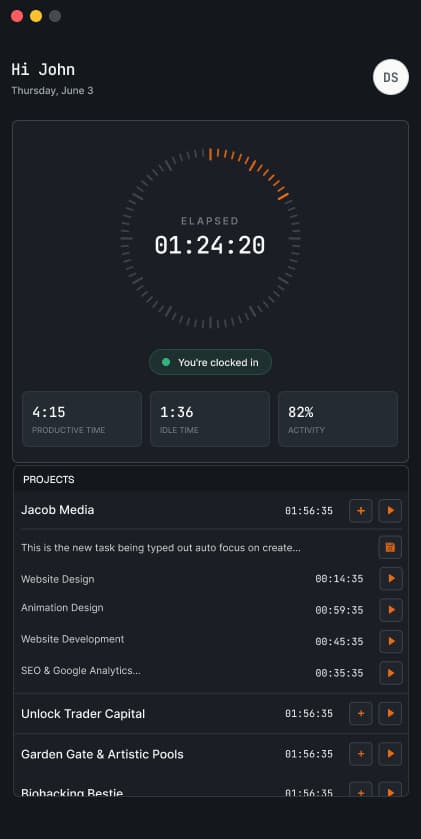
One connected record
Track on desktop. Review on the web.Time, screenshots, notes, and activity stay attached to the work they explain.Industries and operating models
Choose your operating model to see the decisions ClareSight helps your team make—and the evidence that makes those decisions clearer.
Protect project margins
Give operations and delivery leads one reliable record for reviewing billable effort and the work behind every timesheet.
Find the right planLate or incomplete time records hide scope creep until the margin is already gone.
Connect tracked time to clients, projects, tasks, notes, screenshots, and approvals.
Review delivery context and budgets early enough to rebalance work and support accurate billing.
Role-based visibility
Control plans, releases, retention, security settings, and audit visibility across the platform.
Manage members, policies, approvals, projects, billing, and organization-wide workflows.
Run day-to-day operations: attendance, leave, approvals, and access inside the right organization scope.
Review assigned teams, tasks, screenshots, and delivery without seeing unrelated data.
Focus on assigned work, personal time, screenshots, leave, and their own productivity record.
See only approved project progress, summaries, invoices, and information explicitly shared with them.
Reports and insights
Perspectives by role
Representative perspectives based on the operational questions ClareSight is designed to answer across delivery, people, and client-facing teams.
“I need to see where client hours are going before scope creep turns into a margin problem—not after the project closes.”
Plans and feature access
Start with core tracking. Add projects, approvals, planning, governance, and enterprise controls as your operating model grows.
Entry workforce tracking for smaller teams.
Operational tracking with projects, tasks, and broader reporting.
Larger team workflow, approvals, payroll, and finance operations.
Custom roles, IP restrictions, and a data retention period set up around your requirements.
Prices are per user, per month, with a two-user minimum. AI features are included on every paid plan with a monthly usage limit per organization. Data retention varies by plan.
Product and rollout questions
Depending on your organization's settings and plan, ClareSight can connect tracked time with projects, tasks, notes, screenshots, app and website usage, keyboard and mouse activity levels, attendance, and related productivity data.
Yes. Each night ClareSight writes a short, plain-language summary of every person's day and every team's day, and an assistant called Clare answers questions about the people and teams you can see: how much they tracked, what they worked on, tasks completed, and attendance. Owners switch AI on, choose which parts to use, and see usage against a monthly limit set for the organization. AI is included on every paid plan.
By default, summaries are written from tracked figures: time, projects, tasks, attendance, the apps used most, and how the day ran. Screenshots, window titles, and website names are used only if the organization's owner opts in to detailed summaries, blurred screenshots are never used, and web addresses are never sent. People see their own summaries; managers see only the people and teams within their scope. Clare answers with the same access, so nobody can ask about data they could not already see.
No. Summaries are context, not a verdict. They describe what the record shows and how it compares with a person's usual days, and they are written not to judge, rank, or guess at reasons. Activity and idle time are signals that need the surrounding work to interpret, and decisions about people stay with people.
No. ClareSight may measure keyboard and mouse activity to calculate an activity level, but standard workforce monitoring is not intended to record the keys someone presses or the text they type.
Standard workforce monitoring is tied to an active tracking session. When the user stops their tracking session, standard time, activity, app, URL, and screenshot monitoring stops as well.
When enabled by the organization, the desktop app can capture screenshots periodically while tracking is active. Organizations can use available controls to disable capture, blur screenshots, set the capture interval, and set retention rules.
Yes. Employees can review their own time, activity, assigned work, and personal tracking information. Broader team and organization data remains controlled by role-based permissions.
Activity percentage reflects keyboard and mouse input during tracked time; it is not a complete measure of performance. Reading, research, meetings, planning, and other valuable work can naturally produce lower input activity, so the metric should be reviewed alongside projects, tasks, notes, and outcomes.
Yes. The ClareSight desktop app can continue recording supported work-session data while offline and synchronize it after the device reconnects. Signing in and some connected features still require internet access.
Access follows organization roles and assigned responsibility. Employees see their own records, managers and project leads see the teams and projects assigned to them, and owners or authorized administrators manage organization-wide settings and reporting.
Workplace-monitoring laws differ by country, state, and employment context. Organizations are responsible for choosing a lawful and proportionate setup, clearly informing affected workers, obtaining consent where required, and consulting qualified legal counsel for their jurisdiction.
Retention depends on the subscription plan and organization settings. Screenshots and activity records may be deleted automatically under the applicable retention rules, while higher tiers support longer or more configurable retention periods.