
Time tracking
A practical time tracking workflow for remote teams
Connect tracked time to tasks, review exceptions, approve timesheets, and use reports to plan work with better context.
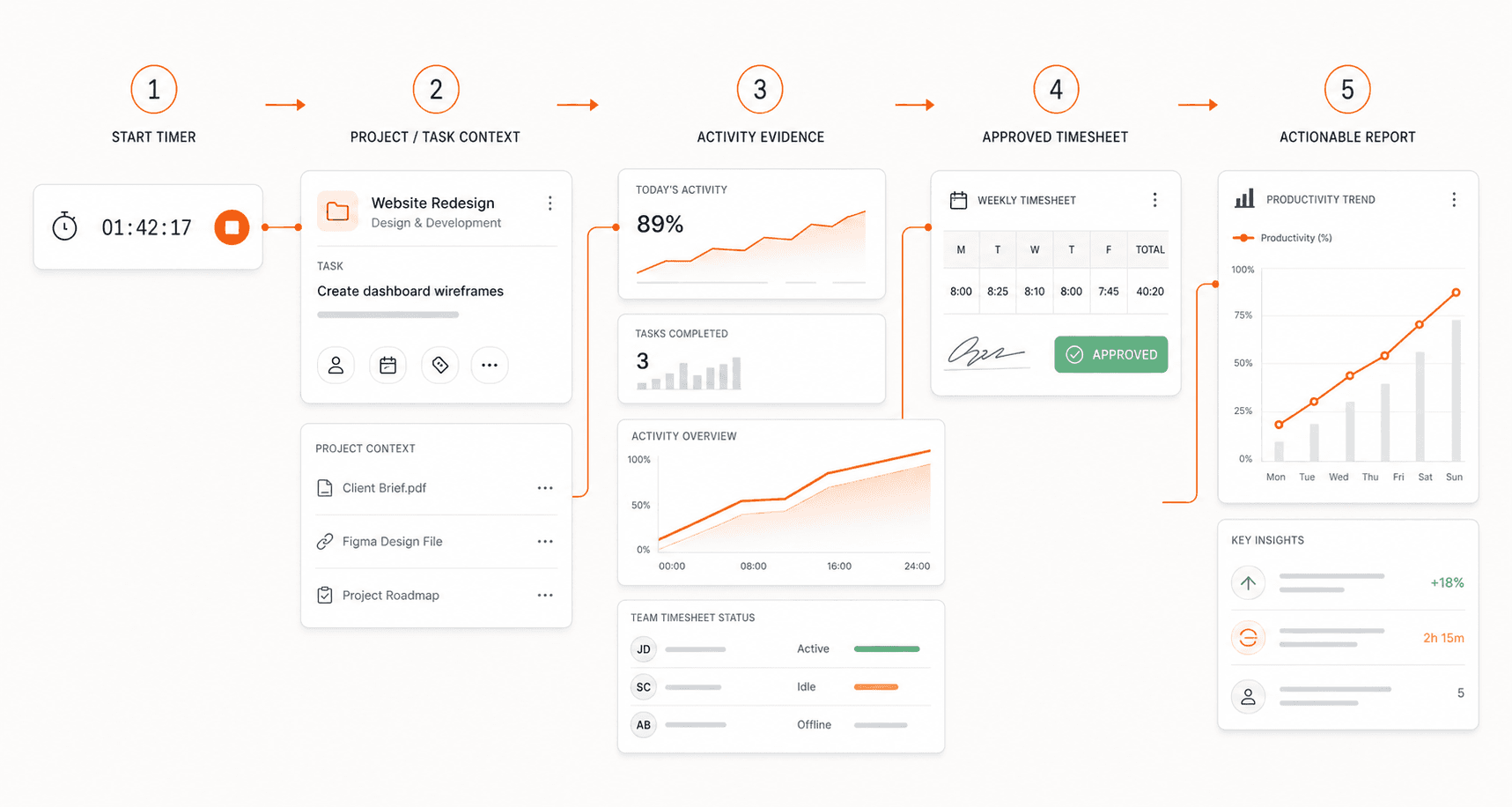
Start with the decision you need to make
Time tracking is most useful when each entry answers a specific question. Which project needs more capacity? Is a client request taking longer than expected? Which timesheets are ready for review? Decide what you need to know before asking everyone to record more information.
For a remote team, a workable starting point is a shared project list, clear task names, a consistent review schedule, and an owner for approvals. Keep the process small enough that people can follow it during a normal working day. Add detail only when it improves a decision.
Agree on what gets recorded
Explain when people should start and stop a tracking session, how to record meetings, and what to do if they forget to stop a timer. Make the correction process as clear as the tracking process. A record that can be explained is more useful than one that merely looks complete.
If your organization enables screenshots or activity monitoring, explain those settings before rollout. Describe what is collected, who can review it, and how long it is retained. Give people a clear route for questions or corrections. Choose the settings that fit the work rather than enabling every option by default.
Connect each session to a task
A duration without context tells a reviewer very little. Use task names that describe the work, such as preparing a client proposal or reviewing a dashboard layout. Add a short note when a task changes direction or when an interruption explains a longer session.
For example, imagine a design task estimated at three hours takes five. The extra time might reflect a new client request, additional revisions, or a blocked handoff. The useful follow-up is to understand that difference and adjust the next estimate, rather than treating the longer duration as a performance verdict.
Review exceptions before approving totals
Give the reviewer a repeatable order: check missing project assignments, unusually long sessions, duplicate entries, and notes that ask for clarification. Ask the person who recorded the time to explain an exception before making a change. Keep the review focused on accuracy and the intended use of the record.
Activity levels can add context, but they do not describe the quality or value of the work. Reading, planning, phone calls, and offline tasks can involve little keyboard or mouse input. Compare activity with the task and its outcome; avoid using a percentage as a standalone productivity score.
Set a predictable approval rhythm
Choose a submission deadline and a review window that suit your team's reporting needs. A weekly review can be a useful starting point because questions are still recent enough to resolve. Make it clear whether an entry is awaiting review, needs a correction, or has been approved.
Before using a report for a downstream decision, confirm which entries it includes. Mixing incomplete records with approved time can make project comparisons misleading. If a correction is needed after approval, use the available correction process and keep the reason understandable to the next reviewer.
Use the report to improve the next week
Look for patterns at the project or team level. Repeated overruns may indicate unclear scope, an unrealistic estimate, or too many handoffs. Discuss the pattern with the people doing the work before deciding what to change. Time data narrows the question; it does not supply every answer.
Finish the review with a concrete action: revise an estimate, clarify a task, redistribute a workload, or remove an unnecessary approval step. Then check whether that change helped in the next review. This turns tracking into a feedback loop instead of an administrative task.
Put the workflow into practice
ClareSight connects tracked time with project and task context, activity evidence, approvals, and reports. Available features depend on your plan and organization settings. Start with the workflow your team needs, then configure the relevant tracking and review controls.
Pilot the process on one project. Ask team members whether task names are clear and ask reviewers which information is missing. Refine the process before expanding it across the organization. The goal is a record that both the person doing the work and the person reviewing it can understand.
Explore the workflow
See how ClareSight works, review the available features, or get the app.
← All articles